
To scale a maintenance business from one van to a subcontractor network, do it in this order: get your own jobs running cleanly, build a short list of subcontractors you have actually checked, then hand them work in stages while you keep the client, the price and the sign-off. Most people try it the other way round. They take on more work first, ring round for help in a panic, and lose margin and reputation in the gap. This guide walks through the steps in the order you would actually do them, and shows where Plan@Job does the admin and where you still make the call.
In Plan@Job you are the Operator. That means the contractor business that manages clients, project delivery, subcontractors and your own in-house operatives. A subcontractor is an external business doing work you assign. An operative is an individual on your own team. Keeping those three roles clear is most of what growing a network is about.
Before you start: decide what you will and will not subcontract
Write this down before you recruit anyone. It stops you saying yes to work you cannot control.
- Keep in-house: the trades you are best at, the first visit to a new client, and anything where your name is on the line straight away.
- Subcontract first: overflow in your own trade, specialist work you already pass on informally, and jobs outside your usual area.
- Do not take on yet: trades where you could not judge whether the work was done properly.
If you cannot inspect it, you cannot sign it off. That rule will save you more than any software.
Step 1: Get your own jobs running cleanly
A network multiplies whatever system you already have. If your own jobs live in a notebook and a WhatsApp thread, adding five subcontractors gives you five times the mess.
- Open Clients and add the clients you already work for, with the right site and contact details.
- Move live work into Jobs, so every job has a client, a site, a scope and a status.
- Add yourself and any operatives under Team.
- Put booked visits on the Schedule, so you can see who is where each day.
- Use Messages for job conversations rather than personal texts, so the history stays with the job.
This step is all you. The platform holds the records, but deciding what each job actually involves is your call.
Step 2: Build your network in Subcontractors
Start small. Three or four businesses you trust are worth more than thirty names you have never met.
- Open Subcontractors and add the people you already use, even informally.
- Record their trade and the areas they cover.
- Use Invites to bring them onto Plan@Job so you can share work and messages with them there.
- Mark where each one is in your vetting process, so you can see at a glance who is checked and who is not.
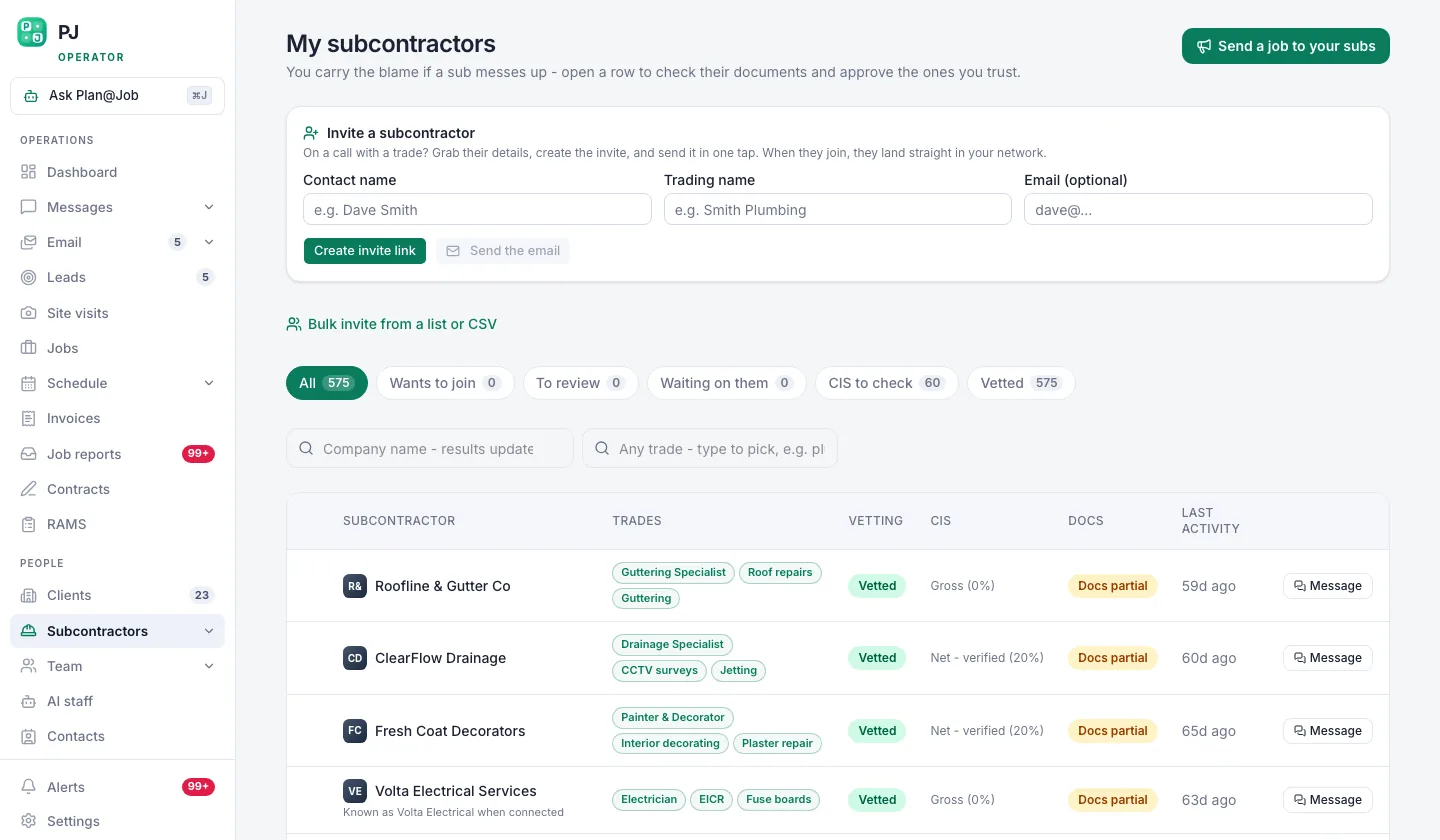 Your own subcontractor network, showing who is vetted and who is still a stranger.
What to check before you trust someone
Your checks are your policy, so set them deliberately. Sensible ones for UK maintenance work include:
- Current public liability insurance, with the certificate seen and the expiry date noted.
- The right competence for regulated work, for example Gas Safe registration for gas work and a recognised scheme or qualification for electrical work. Check the register yourself rather than trusting a photo of a card.
- Recent references or a small trial job you inspect in person.
- How they handle tax status. Read the current HMRC guidance on the Construction Industry Scheme and take advice if you are unsure whether it applies to your work.
In supported workflows a subcontractor can give you a price before vetting is finished. That is useful when you are testing a new area. The decision to actually give them work, and at what stage they must be fully checked, stays with you.
If you need to find new subcontractors in the first place, trade communities such as Contractor Club, a related community for UK contractors, can be a starting point. Treat anyone you meet there like any other stranger until you have checked them.
Step 3: Split bigger jobs into stages
Once you are handing work out, single-line jobs stop being enough. Plan@Job's project plan lets you split a job into internal stages, each with its own scope, dates, status and costs.
- Open the job in Jobs and add stages for each distinct piece of work.
- Set each stage as in-house or subcontracted.
- Record your internal cost for each stage.
The client sees the overall agreed scope and price, plus the evidence you choose to share in the Client portal. Your internal stage costs and the identity of your subcontractors stay internal. That protects your margin and keeps the relationship with you.
The plan does not work out dependencies or a critical path for you. If the plasterer cannot start until the electrician has finished first fix, set those dates yourself.
Illustrative example, not a real customer: a two-person firm takes on a bathroom refit for a regular landlord client. The owner keeps the strip-out and tiling in-house, subcontracts the first and second fix electrics, and gives the plumbing to a trusted plumber. Three stages, three cost lines, one price to the client.
Step 4: Share work and collect prices
This is where the admin load usually breaks a growing business. It is also where Plan@Job's AI staff help most.
- Decide which stages need a subcontractor.
- Share eligible work with your existing vetted network. Daniel Reed, the AI Operations Manager, supports that sharing and chases quotes and proposed dates that have gone quiet.
- Review the prices and dates that come back.
- Choose who gets the work and confirm it yourself.
Daniel does not award work, set prices or commit you to anything. He does the chasing so you are not spending your evenings ringing round. Sophie Bennett, the AI Enquiries Coordinator, can check existing job briefs for missing information and ask for clarification before you share them, and hands the job back to you if two attempts do not get an answer. A clear brief gets you better prices.
Step 5: Run the day from the dashboard
With work spread across several businesses, you need one place that tells you what is waiting on you.
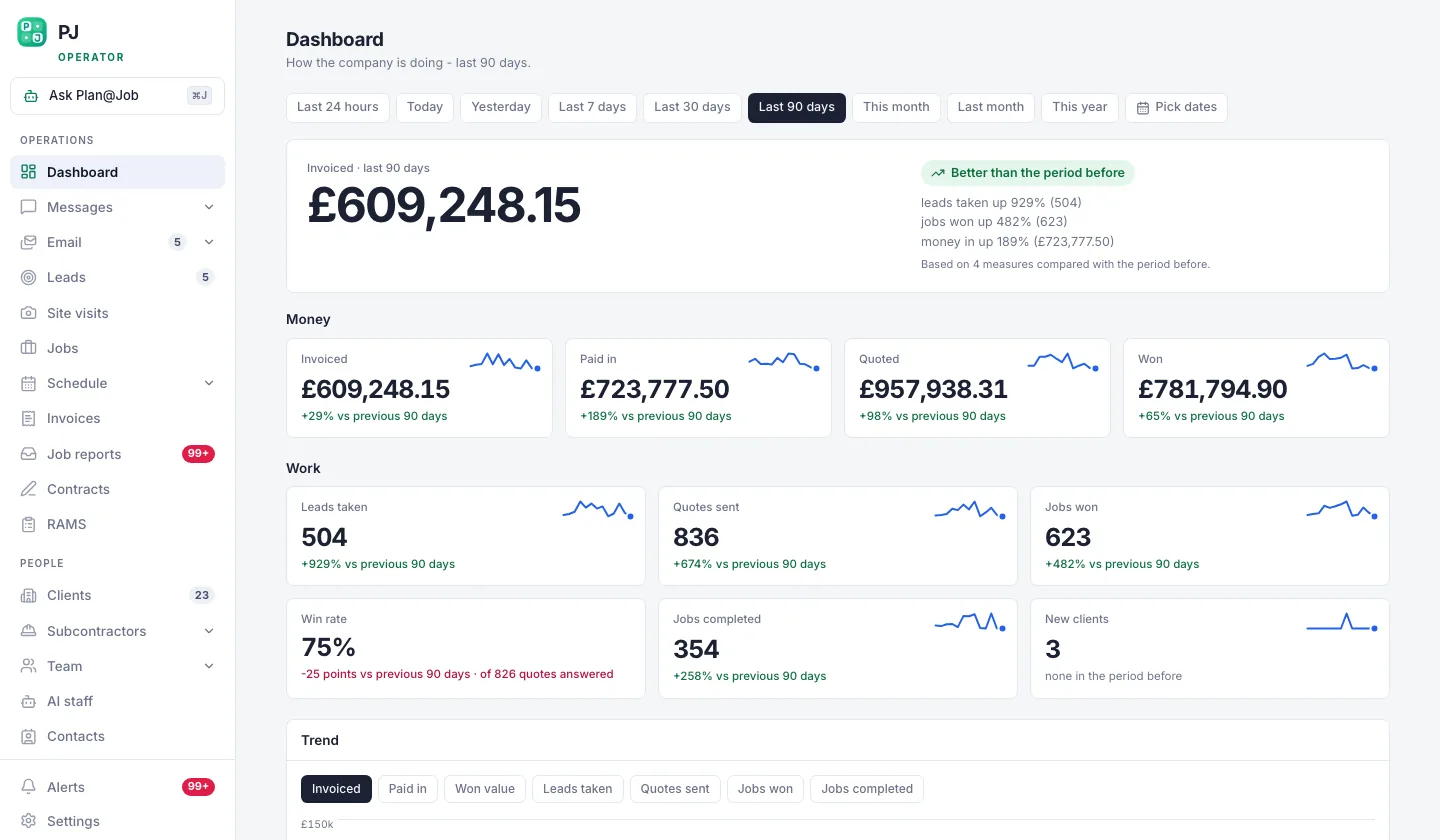 The operator dashboard opens on the decisions waiting for you, not on a wall of charts.
Start each day here. Open jobs, bookings that still need a date and invoices you have not raised are the things that slip first when you grow. Daniel's morning brief gives you a written summary to read alongside it. Then check the Schedule so you know which sites have your people and which have subcontractors.
Step 6: Sign off, invoice and pay
- Ask every subcontractor for photos and notes on completion, and keep them with the job in Job reports.
- Inspect the work yourself, or send a trusted operative, before you sign off. Do not invoice the client off a photo alone on a new subcontractor's first few jobs.
- Raise the client invoice from Invoices.
- Pay your subcontractor under the terms you agreed, from your own bank. Recording a payment in Plan@Job is a record, not a transfer of money.
Maya Collins, the AI Finance Coordinator, prepares deposit requests and overdue payment actions for you to approve. She works within fixed finance workflows and nothing goes out without your approval.
Step 7: Measure which work is worth growing
Once you have a few months of jobs through the system, look at where they came from.
 Work sources answers the question most contractors cannot: which channel actually pays.
Work sources shows which channel each job came from. Put that next to your stage costs and you can see which clients and channels are worth building the network around, and which ones keep you busy without leaving much behind. Grow towards the work that pays, and recruit subcontractors in the trades and areas that work needs.
Who decides what
- You decide: what to subcontract, your vetting checks, who gets each job, the price to the client, sign-off and payment.
- AI staff prepare: brief clarifications, sharing with your vetted network, quote and date chasers, the morning brief, and finance actions for approval.
- The platform holds: jobs, stages, schedules, messages, reports and invoices in one place, with internal costs kept away from the client.
What usually goes wrong
- Recruiting before you have systems. Do Step 1 first, even if it feels slow.
- Too many untested subcontractors. A long list looks reassuring but you cannot inspect thirty people's work. Grow the list as your checks keep up.
- Vague briefs. A one-line job description gets a guess for a price. Fix the brief before you share it.
- Letting the subcontractor become the client's contact. Keep client messages and sign-off with you, and keep subcontractor identity internal.
- Not watching margin per stage. If you only see the job total, a bad subcontract price hides inside it.
Your next step
If you are running one or two vans and want to start building a network without losing control of the client or the margin, look at how Plan@Job works for UK contractors and operators and set up your first jobs and subcontractors there.
FAQ
Do my subcontractors need to be fully vetted before they can quote?
Not always. In supported workflows a subcontractor can price before vetting is complete. You decide when checks must be finished, and you should not give anyone work you have not checked to your own standard.
Will my clients see who is doing the work?
No. Clients see the overall agreed scope and price, and any evidence you share through the Client portal. Internal stage costs and subcontractor identities stay internal.
Can Plan@Job's AI staff hand out work for me?
No. Daniel Reed can share eligible work with your existing vetted network and chase quotes and dates, but awarding the work and setting the price are always your decisions.