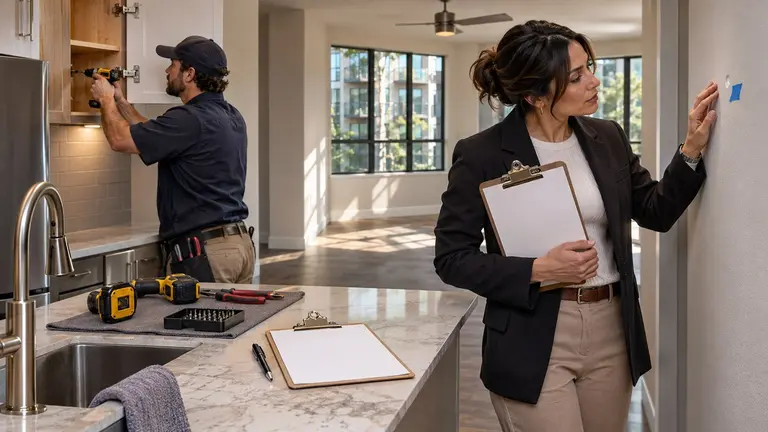
Punch list vs work order comes down to scope and timing. A work order authorizes and tracks one piece of repair work from request to completion. A punch list is a checklist of small unfinished or defective items left at the end of a larger job, such as a unit turn or renovation, that must be closed before you accept the work. Most apartment repairs need a work order. You need a punch list when several trades have worked in a unit and you are deciding whether it is ready for the next resident.
What a work order does
A work order is the instruction. It says what needs fixing, where, who is doing it and how they get in. Later, it is the record you check when someone asks what happened and why.
A useful work order for an apartment repair includes:
- Unit number and exact location, such as primary bath, under the vanity
- What the resident or inspector reported, in their own words
- Photos, if you have them
- Access details: permission to enter, pets, keys or lockbox, and any notice required by your lease and local rules
- Priority and target date
- Who is assigned: an in-house tech or an outside vendor
- Whether the work is pre-approved or needs a quote first
- What done looks like, so nobody argues about it later
A work order opens with a request and closes when the work is complete and checked. One problem, one work order is a good default. If a tech fixing a leaking supply line notices a soft subfloor, that is a new work order, not a line in the notes.
What a punch list does
A punch list comes at the end of a bigger job. The main work is done, but a handful of small things are wrong or missing. Typical apartment punch items look like this:
- Touch-up paint around switch plates and door frames
- A missing outlet cover or cabinet pull
- A cabinet door out of adjustment
- A caulk gap at the tub surround
- A smoke alarm not yet installed or not tested
- Blinds missing in the second bedroom
- A scratch or lifted edge on new flooring
None of these would justify a full work order on its own. Together, they decide whether a unit can be shown and leased. The punch list closes when every item is either fixed or formally accepted as is by the person with authority to accept it.
The key differences
- Timing. A work order starts the work. A punch list finishes it.
- Scope. A work order covers one defined task. A punch list covers many small leftovers across one job.
- Trigger. A work order is triggered by a request, an inspection or a planned task. A punch list is triggered by a walk-through near completion.
- Owner. A work order usually has one assignee. A punch list may have items for several trades.
- Closing. A work order closes when the task is done. A punch list closes when the whole job is accepted.
When to use each in apartment repairs
Single repair requests
A dripping faucet, no heat, a jammed garbage disposal. Use a work order only. There is nothing to punch because there is only one task. Check the fix, add a photo and close it.
Unit turns and make-readies
This is where both tools matter. After move-out, you open work orders by trade: paint, flooring, cleaning, appliance repair, any plumbing or electrical. Once those trades report complete, someone walks the unit and builds a punch list. The unit is not ready until the punch list is closed.
Renovations and larger projects
On a kitchen remodel or a multi-unit upgrade, the contractor's agreement usually ties final payment to completion. The punch list becomes the evidence that the job is complete. Read your contract for how final payment or any retainage is handled. Do not assume a standard rule applies.
How the two work together
Illustrative example: a two-bedroom unit turn after a resident moves out. This is a made-up scenario to show the sequence.
- Move-out inspection. The property manager records what needs doing: full paint, carpet replacement in one bedroom, a cracked range hood light, a deep clean.
- Work orders by trade. Each task gets its own work order with a target date. Paint goes to the in-house tech. Flooring goes to an outside vendor after a quote is approved.
- Trades complete their work. Each work order is marked done with photos.
- Punch walk. The maintenance supervisor walks the unit with the lead tech. They find paint holidays in the hallway, a carpet seam lifting at the closet and a missing outlet cover.
- Assign each item. Paint touch-up goes back to the painter. The seam goes back to the flooring vendor. The outlet cover goes to the in-house tech.
- Re-walk. On the agreed date, the supervisor checks each item and marks it closed or accepted.
- Close out. All work orders close, and the unit is marked ready to lease.
The point is that the punch list does not replace work orders. It checks them.
Writing a punch list that actually gets closed
Punch lists fail when they are vague, shared by too many people or left open for weeks. A few habits help.
Be specific about location
Write north wall of the living room, 3 feet left of the window, not paint touch-up. A tech should be able to find the item without calling you.
One item, one owner
Every item needs one responsible trade or person. If two trades could be to blame, decide before the list goes out.
Take before and after photos
A photo at the walk and a photo at the fix settles most disputes and saves a second trip.
Keep new scope out of the punch list
If the owner decides during the walk that they now want new light fixtures, that is a change, not a punch item. Open a new work order or a change order with its own approval and price. Mixing the two hides cost and blurs who agreed to what.
Set a re-walk date
Agree when you will check the items before you leave the unit. Without a date, a punch list tends to drift.
Decisions that stay with a person
Software can organize the list, chase updates and keep the record. It should not make these calls for you:
- Approving scope and budget for a repair or turn
- Choosing who gets the work
- Accepting a quote or a proposed date
- Deciding whether an item is a defect or new scope
- Accepting a unit as ready to lease
- Approving payment to a vendor or contractor
If a tool claims to do any of those on its own, ask who is accountable when it gets one wrong.
Where Plan@Job fits
Plan@Job is AI-powered project and operations management for construction and property businesses. In Plan@Job, the contractor business that manages clients, project delivery, subcontractors and in-house team members is called the operator.
For a larger job like a unit turn, an operator can use the project plan to split the job into internal stages, each with scope, dates, status and costs. Stages can be delivered in-house or by subcontractors. The client, such as a property manager, sees the overall agreed scope and price plus the evidence the contractor shares. Internal stage costs and subcontractor identity stay internal to the operator.
Plan@Job also has AI staff who work in the background. Sophie Bennett, the AI Enquiries Coordinator, checks existing job briefs for missing information, such as the unit, access details or photos, and asks for clarification. After two attempts, she hands the job to a person. Daniel Reed, the AI Operations Manager, helps with quote and proposed-date follow-ups and prepares a morning brief. None of them award work, set prices or approve payments. Those decisions stay with your team.
Plan@Job's live launch market is the UK. If you manage apartments in the United States, the US property managers page shows current availability and the reserve or waitlist option. Maintenance contractors can check the US contractors page.
Your next step: take one open unit turn this week, list every task as its own work order, then run a proper punch walk before you mark it ready. If you want to see how Plan@Job could support that workflow when it reaches your market, visit the US property managers page.
FAQ
Can a punch list item become its own work order?
Yes. If an item turns out bigger than expected, such as a lifted seam that reveals water damage under the flooring, move it to a new work order with its own scope and approval. Keep the punch list for small finishing items.
Who should do the punch walk?
Someone with the authority to accept the work, usually the maintenance supervisor or property manager, together with the lead tech or contractor. Walking it together means items are agreed on the spot rather than argued over later.
Does a punch list replace a move-in condition report?
No. A punch list is an internal check between you and whoever did the work. A move-in condition report records the unit's condition with the resident. If your lease or state rules call for one, keep it as a separate document.