To build a subcontractor network in a city you don't work in, you need three things before anyone sets foot on site: subbies sorted by trade and distance, proper checks done from your desk, and a small first job that proves who actually turns up. You don't need to live there. You need a process.
I run my back office from Tangier and do UK site visits myself. So I'm not guessing about working remotely. The distance isn't the problem. Not knowing who you're dealing with is the problem.
This guide is for operators. In Plan@Job, an Operator is the contractor business that manages the clients, the project delivery, the subcontractors and its own in-house operatives. If you're winning work in a town where you've got nobody, this is the order I'd do it in.
Why a new city goes wrong before it starts
Most people do it backwards. They win the job first, then post in Facebook groups for a plumber who can start Monday. You take whoever answers. Sometimes that works. Usually you're on the phone at 9pm finding out nobody went.
Here's the part people hate hearing: the network has to exist before the work does. Not a full bench. Two or three names per trade you actually sell, checked and tested, in the postcodes you'll really cover.
Step 1: Decide what you actually need in that city
This one is all you. No software decides it for you.
- List the trades you'll be selling there. Not every trade. The ones the work will actually need.
- Mark the area. A city is big. Pick the postcodes or surrounding towns you'll genuinely cover.
- Be honest about volume. One job a month needs a different kind of subbie from three a week.
- Write down what you need from each trade before they touch a job: insurance, the right registration for that trade, and how they want to be paid.
For UK work the registration bit matters. Gas work needs a Gas Safe registered engineer. Notifiable electrical work needs someone registered with a competent person scheme, or it has to go through building control. Check the current rules for each trade yourself rather than trusting what someone tells you on the phone.
Step 2: Search the Directory by trade and distance
Open Subcontractors and go to the Directory. Search for the trade you need and set the job location. The platform does the sorting: trade first, then distance from the job.
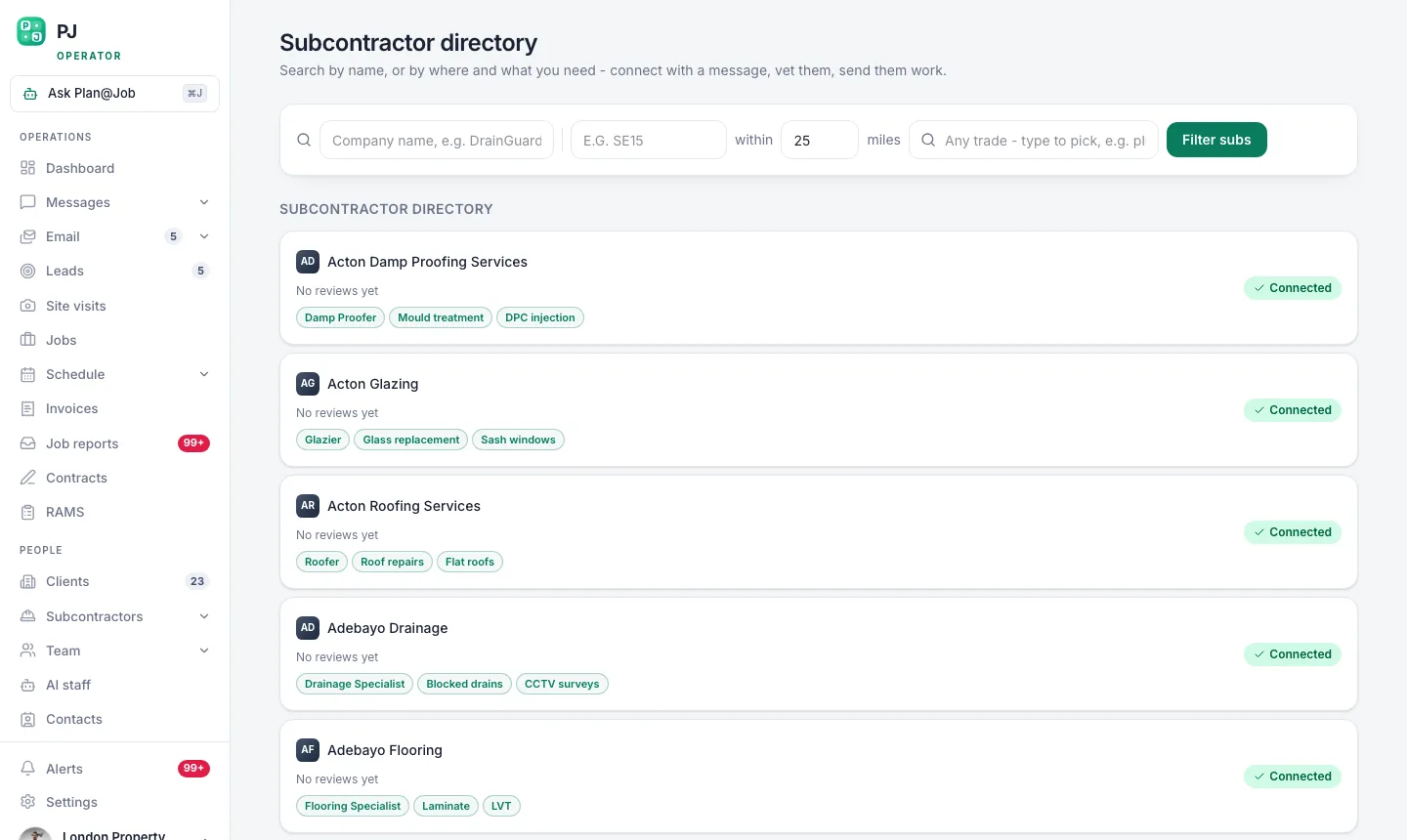 The subcontractor directory ranks by trade first, then by how close they are to the job.
What the platform does: ranks who's out there by trade and how close they are. What you do: decide who's worth a conversation. Read the profile. Look at the areas they say they cover. A good painter forty minutes away in rush hour is not a good painter for an urgent callout.
Don't contact twenty. Contact the five who look right.
Step 3: Run a recruitment ad when the Directory is thin
In some trades and some towns, the Directory will be thin. That's normal. Specialist trades and smaller towns are always harder.
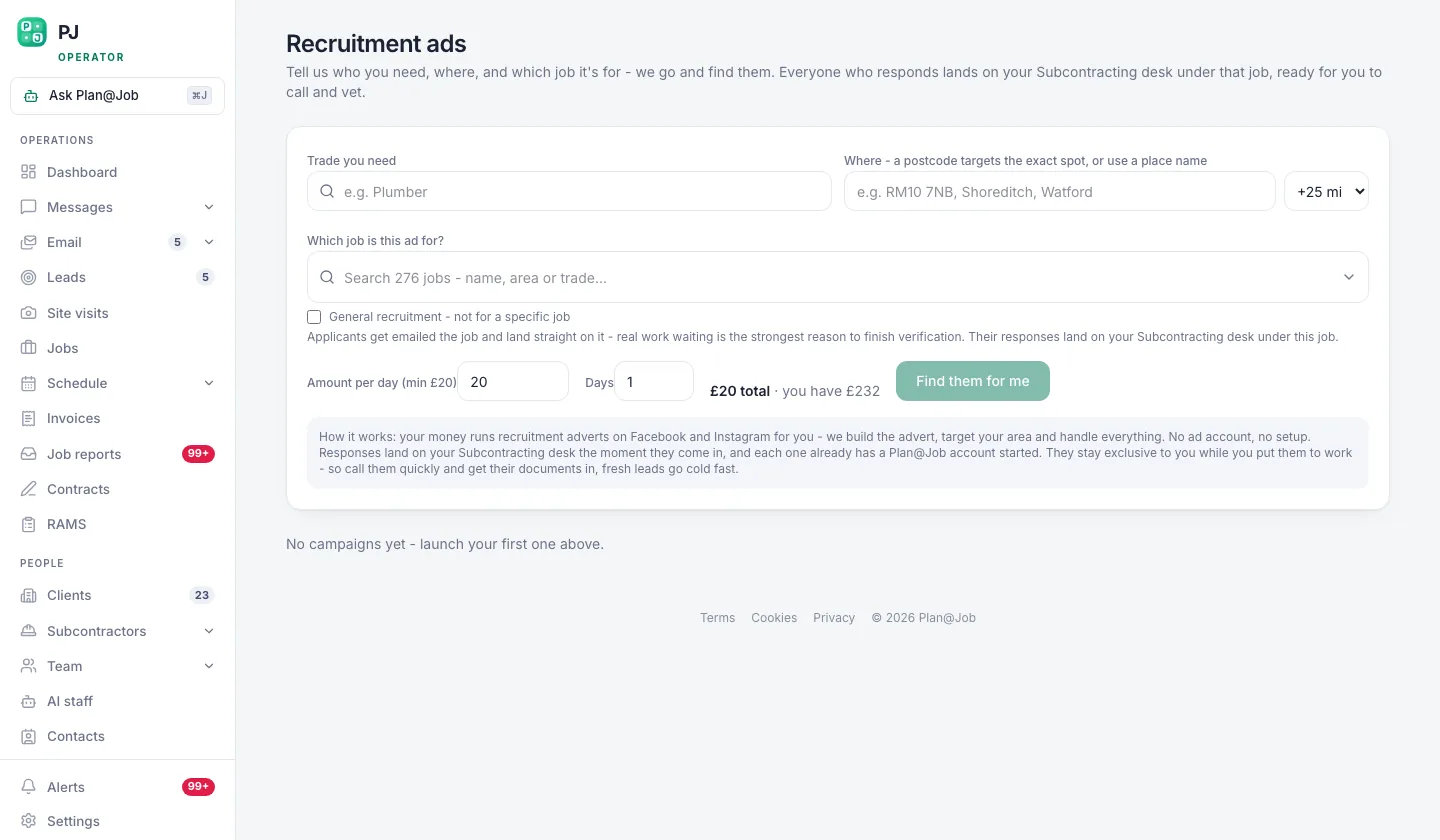 Recruitment ads for when the directory is thin in a trade or a town.
That's what the recruitment ads screen is for. You pick the trade and the city and put an ad out for subbies there. You still decide who comes into your network. An ad brings you names. It doesn't bring you trust.
Run it before you need it. An ad that goes out the week the job starts is too late.
Step 4: Invite them in and do the checks yourself
Once you've got names, bring them into your own network. Send an invite from Invites or add them under Subcontractors, and keep the conversation in Messages so it sits with your records and not buried in your personal WhatsApp.
Then the checks. This is a person's decision, every time. Ask for:
- Proof of public liability insurance, and look at the cover dates, not just the logo.
- The registration their trade needs, then check it on the scheme's own public register yourself.
- Their CIS status, so you know how you'll pay them. You verify that with HMRC, not with them.
- Photos of recent work that actually looks like the job you'll give them.
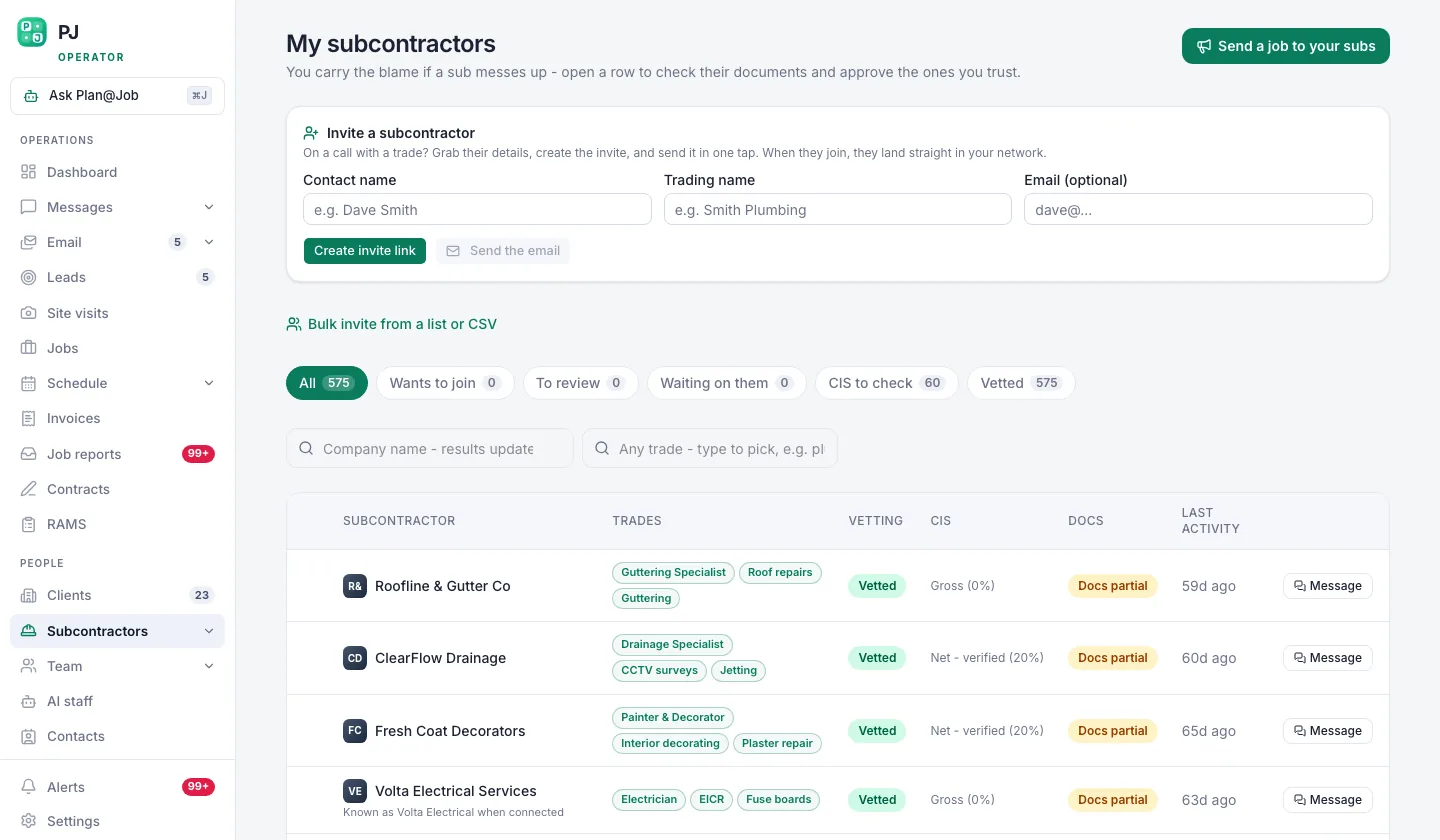 Your own subcontractor network, showing who is vetted and who is still a stranger.
Your network list shows who is vetted and who is still a stranger. Keep it honest. Don't treat someone as vetted because they were nice on the phone.
One thing to know: in supported workflows a subcontractor can price a job before they're fully vetted. That's useful. You get a feel for their numbers early. But a price isn't an award. Who gets the job is still your call, and your checks still come before they're on site for your client.
Step 5: Give them a small job first
Here's the rule I run with: nobody new gets the big one first. Give them something small and contained. A snag list, a small repair, a half-day job.
You're not only testing their skill. You're testing whether they answer the phone, turn up on the day they said, send photos without being chased and leave the site clean.
Book it in Jobs, put it on the Schedule, ask for evidence as they go, and actually read the Job reports. If you can get there for a site visit on the first one, go. I still do site visits myself. You learn more in ten minutes on site than in ten phone calls.
If the work is bigger and you're running it as a project, Plan@Job lets you split the job into internal stages with scope, dates, status and costs, delivered by subbies or your own operatives. The client sees the overall agreed scope and price plus the evidence you share. Your stage costs and who the subbie is stay internal. That's your margin and your network, and it stays yours. More on how that works in project management.
Step 6: Keep the network warm without living on the phone
A network you only call when you're desperate isn't a network. It's a list.
This is where the AI staff help. Daniel Reed, the AI Operations Manager, supports sharing eligible jobs with your existing vetted network, follows up on quotes and proposed dates, and gives you a morning brief. He chases. He doesn't award. You still decide who gets the work and at what price. You can see what each of them does on the AI staff page.
What you still do yourself: pay on time, give honest feedback after jobs, and tell your good subbies when more work is coming. That's what keeps them picking up when you call. It's not the price - it's the service. And that works both ways.
What usually goes wrong
- Building after you win. Start the network before the first job lands in that city.
- One name per trade. They go on holiday or take a bigger contract and you've got nothing. Get at least two.
- Skipping checks because it's urgent. Urgent is exactly when it bites you.
- A big first job. A new subbie on a full refurb is a gamble with your client's money and your name.
- Chats scattered across five apps. Keep it in Messages so the history sits in one place.
- Trusting the area claim. Someone who says they cover the whole city usually means the side they live on.
If you want to talk it through with people doing the same thing, Contractor Club is the community I run for people building contracting businesses.
The next move
Listen, the city isn't the hard part. The bench is. Before you chase work there, open the Directory and see who's already there in your trades. If you're not set up yet, start with Plan@Job for contractors and build the network before the work lands, not after.
FAQ
How many subcontractors do I need per trade in a new city?
Start with two you've checked and tested for every trade you sell there. One is a single point of failure. Add more when the volume justifies it, not before.
Can I build a subcontractor network without visiting the city?
You can do most of it from your desk: searching, checking insurance and registrations, getting prices. But I'd still go for the first job or two if you can. Meeting someone on site tells you things a profile never will.
Does Plan@Job decide which subcontractors are good enough?
No. The platform helps you find subbies, shows who's vetted in your network and supports the follow-ups. Checking credentials and deciding who works on your client's job stays with you, and it should.