
A UK property manager email list is only worth emailing if every name on it is a real person who commissions the kind of work you do, inside the area you cover, and you have written down why you are allowed to contact them and why they might want to hear from you. That is the short answer. Most operators - the contractor business that manages the clients, the project delivery, the subcontractors and its own operatives - go about it the other way round. They buy a spreadsheet of thousands of addresses, send one generic email, get almost no replies and then decide email doesn't work. The list was the problem, not email. This guide goes through building the list properly, in the order you would actually do it. It covers where the Contacts, Email and Leads screens in Plan@Job come in, and which steps need your judgement rather than the software's.
Step 1: Decide who you actually want to work for
Before you collect a single address, write down what a good property manager client looks like for your business. If you skip this, the list turns into a pile of names you have no reason to contact.
- Pick the types of manager. Block management firms, letting agents with a managed portfolio, housing associations, commercial property and facilities managers, and build-to-rent operators all buy work differently. A block manager wants someone reliable for communal repairs and planned works. A letting agent often wants fast responses between tenancies. Choose two or three types, not all of them.
- Draw your patch. List the postcodes or towns you can reach and still turn up on time. A manager 90 minutes away who needs a leak looked at today is not a prospect.
- Match the work to what you can do. Write down the jobs you can deliver well, whether with your own operatives or with subcontractors you trust. Leave out work you would have to fake.
This step is entirely a person's decision. Nothing in the platform can tell you which clients suit your margins and your team.
Step 2: Gather names from sources you can stand behind
Start with the people who already know you, because those are the warmest contacts and the easiest to justify. Then work outwards.
- Past and current clients in Clients, especially anyone who has gone quiet.
- Quotes that never converted, which you will find in Leads. A manager who asked for a price last year already knows your name.
- People who contacted you through your website, by phone or at a local event, such as a landlord association meeting.
- Agency and management company websites. Look for the named person who handles maintenance or works, not the generic info@ address.
- Referrals from trades you work alongside. A roofer or electrician who already works for a block manager can introduce you. Communities such as ContractorClub are one place where UK contractors swap those introductions.
Don't use bought lists. You can't check where the names came from, a lot of them will be out of date, and you will struggle to show a lawful basis for contacting them.
Step 3: Check each record before it goes in
This is the slow part, and it is what makes the list worth emailing. Check each contact against three questions.
Is it a named person in the right role?
You want the person who books contractors: a property manager, block manager, maintenance coordinator or head of lettings. A managing director at a large agency often isn't the right person. Write down the role as you found it.
What kind of organisation is it?
Under current UK rules (PECR alongside UK GDPR), emailing a staff member at a limited company or LLP is treated differently from emailing a sole trader or a partnership. Sole traders and partnerships generally get the same protection as individual consumers. A quick search on Companies House will show which kind of organisation you are dealing with. Every email should say who you are and give a simple way to opt out. This is general guidance, not legal advice, so check the ICO's current direct marketing guidance before you send.
Why would they want to hear from you?
Write down one specific reason for each contact. Examples: "manages blocks in our patch", "asked for a damp quote in spring" or "referred by our electrician". If you can't think of a reason, leave the contact off the list.
Step 4: Build the list in Contacts
When a record passes those checks, add it in Plan@Job.
- Open Contacts from the main navigation.
- Add the contact with their name, organisation, role and email address.
- Assign an owner, the person in your team responsible for that relationship.
- Set the status to show where they are, for example not yet contacted.
- Add a note with the source and the reason you recorded in Step 3.
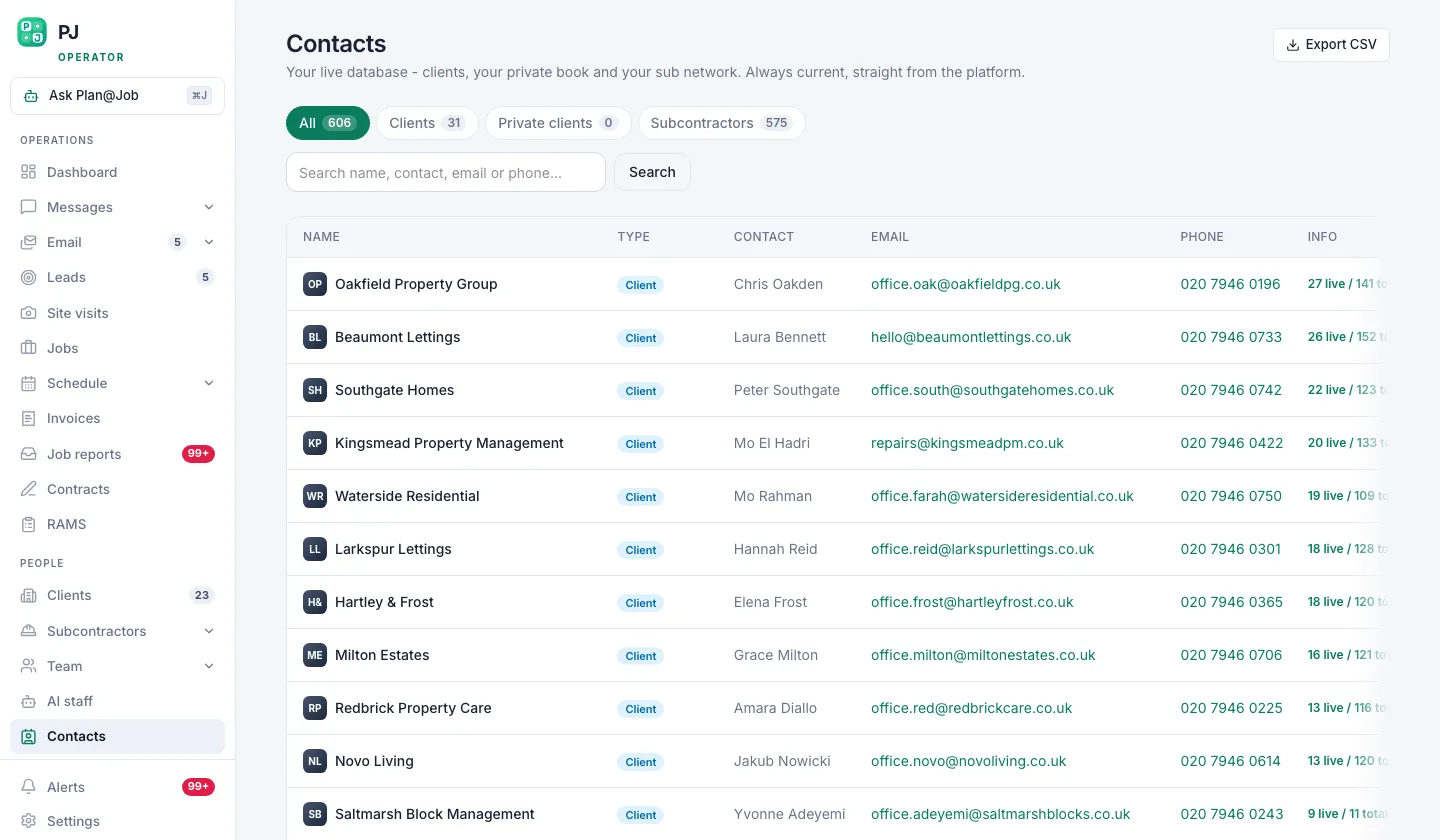 Contacts is the list you build before any campaign goes out.
The platform keeps the owner, status and last contact date visible in one list. That stops two people in your office emailing the same manager in the same week. The checking and the decision about who goes on the list are still yours.
Step 5: Write for one segment at a time
Sort your contacts into small groups that share a reason, such as block managers in one town or agents who had a quote from you and didn't go ahead. Then write one email for each group.
Illustrative example (fictional): an operator covering south Manchester sorts out six block managers who look after older converted buildings. The email refers to communal area repairs and gutter clearance before winter, names the postcodes the team covers and asks one question: "Who handles reactive repairs for your blocks at the moment, and would a second contractor on your list help?" It has no attachments, no brochure and a clear opt-out line.
Draft and send it from Email. A person should read and approve every first-contact message before it goes. First contact with a new client normally needs a person's approval in Plan@Job, and that is deliberate. The AI staff are not a cold-sales engine. Daniel Reed, the AI Operations Manager, helps with follow-ups on quotes and proposed dates for jobs that already exist, and with the morning brief. He doesn't decide who you prospect or send cold outreach on his own.
Step 6: Move replies into Leads and book the visit
A reply is the point where a contact becomes a real opportunity.
- Update the contact's status in Contacts so the owner can see it has moved on.
- Create the enquiry in Leads with whatever the manager has told you about the property and the work.
- Book it in Site visits so it shows on the Schedule for whoever is going.
- If it goes ahead, turn it into a job in Jobs.
For bigger work, you can use the project plan to split the job into internal stages, each with its own scope, dates, status and costs, and delivered either by your own team or by subcontractors. The property manager sees the overall agreed scope and price, plus any evidence you share. Your internal stage costs and the identity of your subcontractors stay internal.
Whether to quote, what price to give and which dates to offer are all your decisions.
Step 7: Clean the list every month
A list goes stale faster than most people expect. Once a month:
- Deal with opt-out requests straight away and make sure those people are never emailed again.
- Remove or correct addresses that bounce.
- Update contacts who have changed jobs. Property managers move between agencies often, and the new agency may be a prospect too.
- Move anyone who has had two or three emails and never replied into a longer-gap group, or remove them.
When to add the paid lane
Once your own contacts, referrals and follow-ups are running steadily, you can add paid reach.
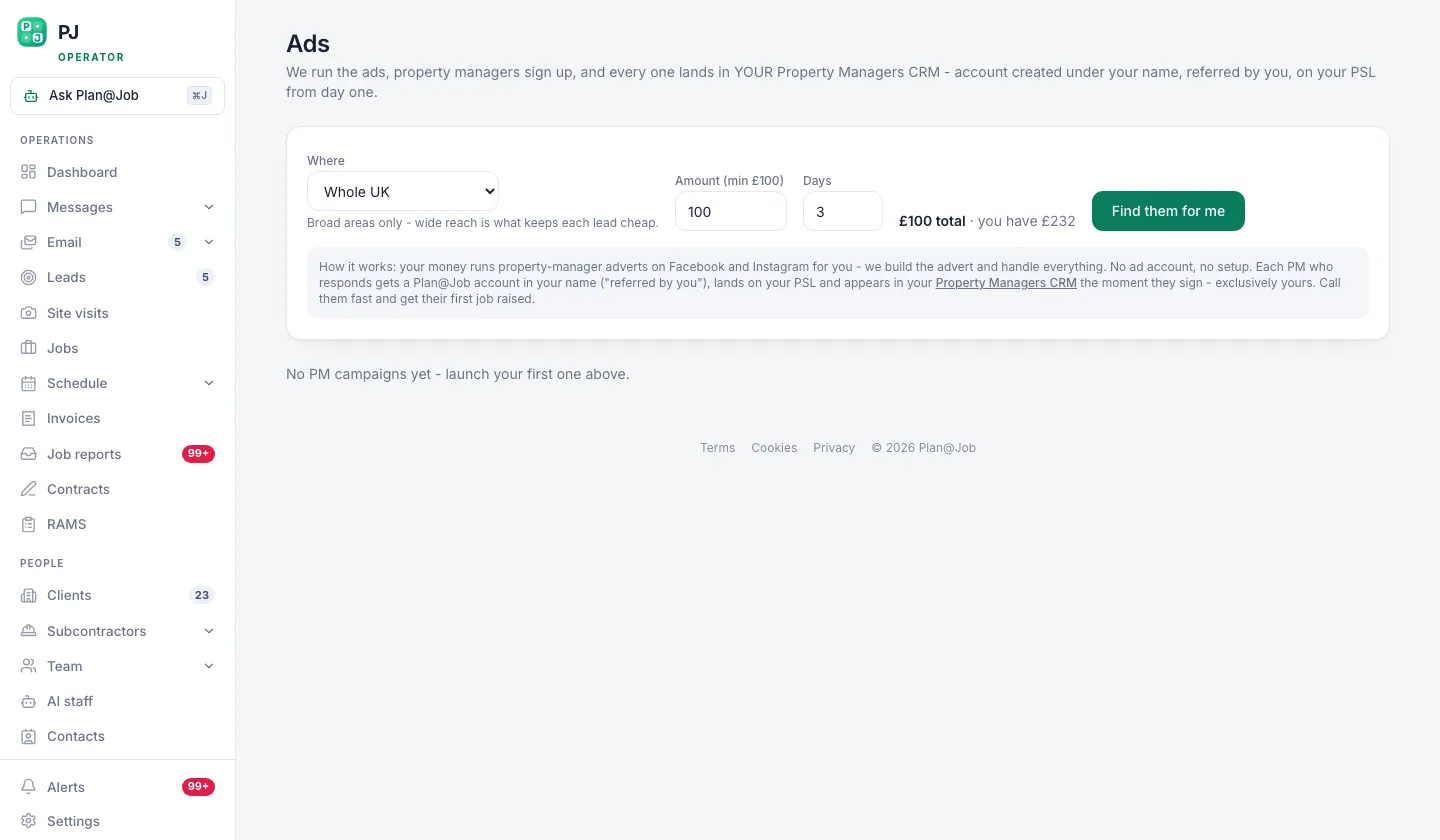 Find clients is the paid lane, for when the free lanes are already running.
Find clients gives you advertising options for reaching property managers. Paying for it is a choice you make. It works best once your Contacts and Leads are tidy, because paid enquiries need the same fast, organised follow-up as everything else.
What usually goes wrong
- Volume before quality. A few hundred unchecked addresses will do worse than a few dozen checked ones. The checking is the real work.
- Generic addresses. Emails to info@ often never reach the person who books contractors. Find the named person.
- Claiming what you can't deliver. If you promise same-day response across a whole county, your first job will show whether it's true.
- No owner. Contacts without an owner don't get followed up. Assign every one.
- Ignoring opt-outs. It's a legal problem and a reputation problem, and property managers talk to each other.
Your next step
If you run a contracting business and want your contacts, leads, site visits and jobs in one place, see how Plan@Job works for UK contractors and operators, then build your first 20 checked contacts before you write a single campaign.
FAQ
Can I email property managers at UK companies without their consent?
In general, UK rules allow business-to-business marketing emails to staff at limited companies and LLPs without prior consent, as long as you say who you are and offer an easy opt-out. Sole traders and partnerships are treated more like individuals and are covered by stricter rules. Check the ICO's current guidance for your own situation.
Should I buy a property manager email list?
It's usually a poor use of money. You can't check where the names came from, a lot of them will be out of date, and it's harder to show a lawful reason for contacting each person. A smaller list you have built and checked yourself is easier to defend and more likely to get replies.
How big should my list be before I start emailing?
There is no magic number. Start with as many contacts as you can properly check and write a relevant email for, even if that's only a dozen. Grow the list steadily as you learn which segments reply.