A good B2B email follow up sequence is one first email and three short follow-ups. You write them in your own words, send them to a list you picked by hand, and stop the moment a real person replies. That's the whole thing. Most sequences don't sound automated because of the software. They sound automated because people write them like a brochure and fire them at every email address they can find.
I built a property maintenance company in London that worked for housing associations and letting agents. The rule I ran by was simple. The first email introduces you. The follow-up gets you the work. Property managers don't need a contractor on the day you email them. They need one the week their usual contractor stops picking up. Your follow-up has to be sitting in their inbox that week, and it has to sound like a person wrote it.
This guide is for operators. In Plan@Job, an operator is the contractor business that runs the clients, the jobs, the subbies and its own operatives. Here's how to set up follow-ups that read like you, in the order I'd do it, and which bits still need you.
Why do most follow-up emails sound automated?
You can spot a robot email in two seconds. So can a property manager who gets them every day.
The usual giveaways:
- "Just bumping this to the top of your inbox."
- "Hi {first_name}" because the field was blank.
- The same email going to a housing association and a two-branch letting agent.
- A PDF brochure attached to the first email.
- A follow-up landing two days after they already replied.
That last one is the killer. It tells them nobody is reading. Fix the list, fix the words and watch the replies, and most of the problem goes away.
Step 1: Build your list in Contacts
Everything starts in Contacts, not the outreach screen. If the list is wrong, the best email in the world still lands with the wrong person.
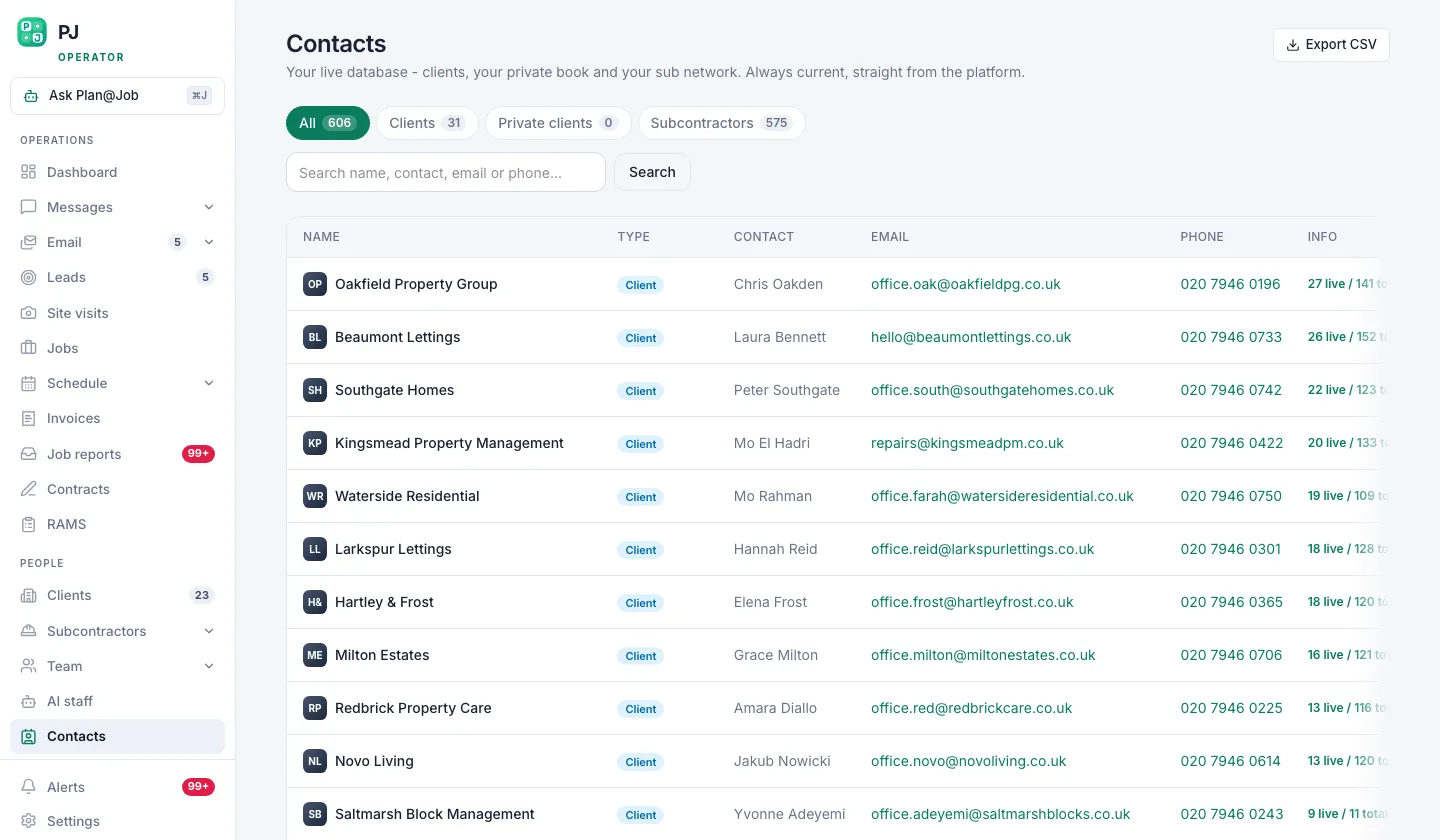 Contacts is the list you build before any campaign goes out.
- Open Contacts and add the people you actually want work from. That means property managers, letting agents, block managers and facilities people in the areas you cover.
- Fill in name, company and role properly. A blank first name is how you end up sending "Hi there" to someone you met on a site visit.
- Set the owner. One person in your business owns each relationship, so replies don't fall between two desks.
- Check status and last contact before anyone goes on a campaign. If you spoke to them last week, they don't need a cold email this week.
- Take off anyone who has told you no.
This step is all you. The platform holds the list. Deciding who goes on it is a judgement call about your area, your trades and the work you actually want.
A small list of the right people beats a big random one. Every time.
Step 2: Write the first email like a voice note
Read your first email out loud. If it sounds like a company, rewrite it. If it sounds like you leaving a voice note for someone you'd like to work with, it's ready.
Give one reason you're writing, say what you do well, then make one easy ask. No brochure. No list of every trade you've ever touched. No "we pride ourselves".
Illustrative example, not a real campaign:
Subject: Repairs and voids in Croydon
Hi Sarah,
I run a maintenance contractor covering Croydon and Sutton. We do reactive repairs and void works for letting agents, with photo reports on every job.
If your current contractor can't get to something this week, send it over and I'll tell you straight whether we can take it.
[Your name] [Your mobile]
Look at what's missing. No logo, no attachments, no "I hope this email finds you well". The subject line is what a colleague would write, not a headline.
Step 3: Write three follow-ups that each add something
Every follow-up needs a reason to exist. "Just checking in" isn't a reason. Here's the shape I'd use:
- First follow-up, a few working days later. One or two lines. Add one new detail, like the postcodes you cover or the fact that you can handle keys and access for voids.
- Second follow-up, about a week after that. Give them something useful. A short line on what you check at a void handover, or an offer to come and look at a problem property on a site visit.
- Third follow-up, a week or two later. The clean close. "I'll leave it here. If something comes up you can't get covered, reply to this and I'll pick it up."
Then stop. Four emails is plenty. After that you're not following up, you're nagging.
Illustrative follow-up line: "Hi Sarah, forgot to say we cover the SM and CR postcodes, so short-notice jobs in Sutton are fine for us."
Keep them in the same voice as the first email. Short enough to read on a phone between viewings.
Step 4: Set up the sequence in client outreach
Now the platform does its part.
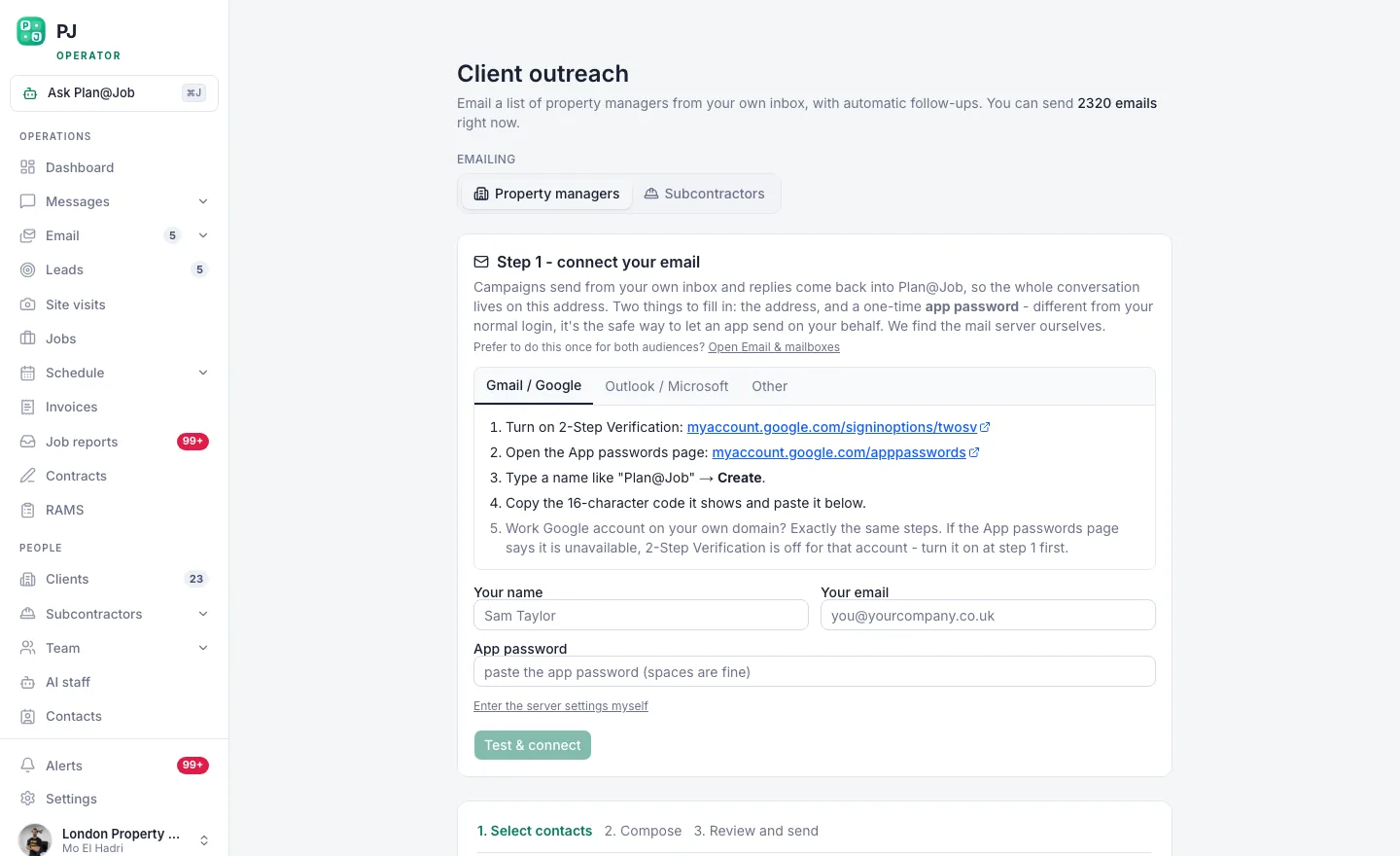 Client outreach: pick the list, write the sequence, and let the follow-ups run themselves.
- Open the client outreach screen and pick the list you built in Contacts.
- Paste in your first email and your three follow-ups.
- Set the timing for each follow-up.
- Send a test to yourself. Read it on your phone. Check every name pulls through.
- Reply to your own test so you see exactly what happens to the sequence when a real person answers.
- Approve it and launch.
Here's the split. You decide who gets it, what it says, when it goes and whether it goes at all. First contact with a new client normally needs a person's approval in Plan@Job, and that's deliberate. Once you've approved it, the platform sends the follow-ups on the schedule you set. So you're not sitting there with a spreadsheet and a reminder on your phone.
Step 5: When someone replies, you take over
A reply is the whole point. Don't let it sit.
Answer it yourself, same day if you can, in plain words. Add them to Leads so the conversation doesn't live in one person's inbox. If there's a property to look at, book it in Site visits. Then quote.
Once the quote is out, AI staff can carry some of the chasing. Daniel Reed, the AI Operations Manager, handles follow-ups on quotes and proposed dates, and puts what's outstanding into your morning brief. He doesn't set your prices and he doesn't award anything. That's still you.
If the property manager sends a job brief with half the details missing, Sophie Bennett, the AI Enquiries Coordinator, checks it and asks them for what's missing. If she still hasn't got a clear answer after two attempts, she hands it back to a person. You can see how both of them work on the AI staff page.
What usually goes wrong
Same mistakes, over and over:
- The list is too wide. You email every agent in the county and half of them are outside the area you actually cover.
- Nobody owns the replies. Set an owner in Contacts and stick to it.
- The follow-ups repeat the first email. Each one has to add something or it's noise.
- You give up after one email. One email is an introduction, not a campaign.
- You ignore the rules. UK data protection and electronic marketing rules still apply to business email, and sole traders and some partnerships are treated more like individuals. Give people an easy way to opt out, take them off when they ask, and check the current ICO guidance before your first campaign.
None of this is complicated. It's just discipline, and most people skip it.
The next move
Build one list of twenty people you'd genuinely like work from. Write four emails. Approve them. Then spend your time on the replies, because that's where you win the work.
If you run a contracting business and want your outreach, leads, quotes and jobs in one place, start at Plan@Job for contractors. And if you want to compare notes with other people building contracting businesses, that's what Contractor Club is for.
FAQ
How many emails should a B2B follow-up sequence have?
Four is plenty: one first email and three follow-ups spread over a few weeks. Each one should add something new. After the fourth, stop, and leave them in Contacts for a fresh conversation later.
Is it legal to cold email property managers in the UK?
Generally you can email people at limited companies about your services, as long as you say who you are and give them an easy way to opt out. Sole traders and some partnerships get more protection, closer to what individual consumers get. Rules change, so check the current ICO guidance rather than taking my word for it.
Will Plan@Job's AI staff write and send my outreach for me?
Not on their own. You write the sequence and approve first contact with new clients. AI staff work in the background on specific tasks. Daniel Reed handles quote and proposed-date follow-ups, and Sophie Bennett checks job briefs for missing information. Neither of them goes off and finds new clients for you.