Start with your jobs
“Show my recent Plan@Job jobs. Help me choose one that needs attention, then review its scope and quotes. Tell me what needs my decision.”
Read your own jobs and inspect the selected job and its quotes.
Personal onboarding for operators
Find opportunities, recruit tradespeople, draft contracts and run jobs, email and money in one place. AI staff help with the administration; an experienced operator helps you get started.
See inside the dashboardThree staged payments, plus A$400/month after entry
Reservation only. Non-refundable on a change of mind.
Based on current availability. Your estimate is recorded after payment.
Explore all the features/See the full payment breakdown/Explore the Claude connection
Review the full costs and agreement before paying. Secure checkout through Stripe, payable to Planajob Ltd. No account or guaranteed work is included in today's reservation.
Inside Plan@Job
Explore real screens before you reserve. These are screenshots of our working demo account, with illustrative company data. The figures show how the product works, not customer results or promised earnings.
Illustrative example · AUD
A$44,586
Example invoiced total
Illustrative example · AUD
A$19,608.85
Example paid-in total
Illustrative example · AUD
170
Example quotes sent
Example figures in AUD, not earnings forecasts or currency conversions. The authentic screenshots below show our UK demo account in GBP; they are not relabelled as local customer results.
See the money and the work side by side. Invoiced and paid-in totals stay separate, so a busy pipeline is never mistaken for cash in the bank.
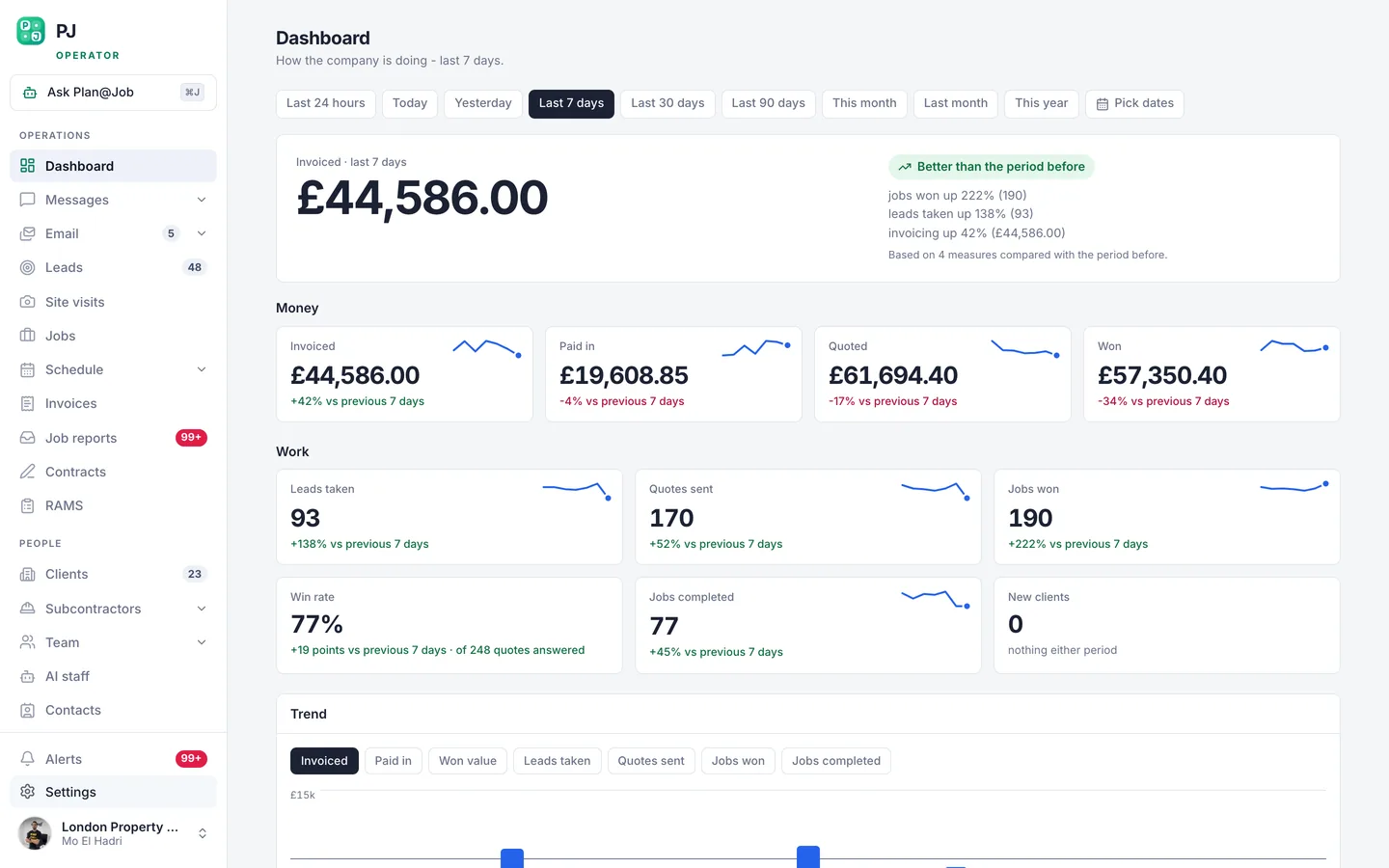
Illustrative UK demo account, captured 20 September 2026. Tap the screen to open the full desktop view. Your account starts with your own business data.
Your business, in a conversation
Your jobs, quotes and subcontracting desk become something you can work with in plain English. Connect your operator account, choose its permissions and ask a useful question.
“Show my recent Plan@Job jobs. Help me choose one that needs attention, then review its scope and quotes. Tell me what needs my decision.”
Read your own jobs and inspect the selected job and its quotes.
“Help me prepare a subcontracting brief for a Plan@Job job. Ask me to choose the job, check the existing scope and quotes, then show me the brief before saving it.”
Prepare a brief using the job record, then save it when you ask.
“Review my Plan@Job subcontracting desk. Help me choose the next follow-up, agree an owner and due date, then save it as an internal task. Do not contact anyone.”
Turn a decision into a dated internal task on the relevant desk.
The connector and your AI staff have different jobs.
Claude can read permitted records and save supported setup changes, briefs and internal follow-ups. The connector does not send email or WhatsApp, award work, set prices or move money. Your Plan@Job inbox and AI staff handle supported communication workflows under the controls you choose.
Requires an eligible Claude account and an authorised Plan@Job operator connection. Job tools become available after operator activation. Claude access is separate from your Plan@Job licence.
What it costs
Your entry cost is split across three stages. The monthly licence is additional, and the final entry payment is triggered by invoices you issue, not by payments you receive.
Today
A$2,000
Reserves your onboarding. Non-refundable if you change your mind; refunded in full if we decline your onboarding.
A$2,000 paid
When you are onboarded
A$4,000
Your account opens, an operator trains you, and your jobs start running through the platform.
A$6,000 in entry payments to open your account
After you have invoiced A$20,000
A$4,000
Falls due only once you have invoiced A$20,000 to your own clients through the platform, whether or not those invoices have been paid. This is not a promise of revenue.
If you never get there, you never pay it
So A$6,000 puts you inside and working. The last A$4,000 does not move until the platform has already invoiced A$20,000 of your work.
A$400
a month, once you are in
Held at A$400 for 3 years from the day your account opens. Your first licence payment date is agreed before entry checkout. The price lock is written into the agreement you sign.
Prices are shown in your own currency and exclude sales tax or VAT where it applies. There is no trial, no free tier and no discount for paying it all at once.
Reserve onboarding for A$2,000Eight steps. Three payments, and you can see all three before you pay the first. The last one only falls due after you have invoiced A$20,000 to your own clients through the platform.
Your reservation is recorded when payment is confirmed. Your confirmation sets out the next steps and estimated contact date.
Our current contact estimate is 1 days from today. Your confirmation records your estimate, and we send preparation notes while you wait.
A real conversation about your business, your trade, where you work and what you want the platform to run for you.
Your company, your clients, your subcontractors and your jobs are set up with you, not handed to you.
Your account opens. You are paired with an operator who is already running their business on Plan@Job.
By that operator, not by a video. Entry to Plan@Job is by referral and training: somebody already inside teaches you how the work is won, priced and kept.
Your jobs, your quotes, your contracts, your subcontractors, your invoices and your AI staff, all on one system.
Then, and only then, the last payment falls due. If you never reach it, you never pay it. Your licence is A$400 a month, held at that price for 3 years.
From finding opportunities to collecting payment, explore the tools inside. Tender feeds and the work-source directory currently cover the UK; overseas local tender feeds are not included.
Match published contracts to your trades, working area and contract value. Review the buyer, scope and deadline, then track the opportunities you want to pursue. Current public feeds: UK Contracts Finder and Find a Tender. Company verification required.
Follow UK planned procurements, approaching deadlines and published awards. Keep a tender pipeline and see who won when an award is published. Discovery helps you choose where to bid; it does not guarantee an award.
Explore the UK work-source directory: housing associations, councils, frameworks, main-contractor supply chains and insurance networks. Follow registration routes and track the lists you have applied to. Available after company verification.
Manage adverts, applications, document checks and onboarding for operatives, subcontractors and office staff. Keep applicants and the people already working with you in one connected workflow.
Describe the deal and name the parties. AI prepares a draft you can edit and redraft, with missing details flagged before sending. Review the terms, request signatures and keep the signed record. You remain responsible for the terms and their suitability for your jurisdiction.
Enquiry, quote, award, booking, photos, variations, completion report and invoice. Keep the scope, decisions and supporting evidence with the job.
Brief your vetted list and the wider network on the work, collect prices and compare responses. You decide your client price and who gets the job.
Connect your mailbox, organise client and subcontractor conversations, assign an owner and keep replies and follow-ups visible to the office.
Plan visits, assign operatives and see priorities and job references together. Give the office and the people on site a shared view of the booked work.
Prepare job risk assessments and method statements, collect documents and keep completion evidence on the record. Local regulatory requirements still need your review.
See quoted, won, invoiced and paid totals on the dashboard. Raise deposits, send invoices from your connected email and schedule overdue follow-ups.
Connect your Facebook and Instagram ad account and bring leads into your CRM with spend alongside them. Follow the path from enquiry to won work.
Sophie helps prepare briefs, Daniel helps move work forward and Maya helps with the money administration. Review their work and control the permissions for actions taken in your name.
Review jobs and quotes, prepare a subcontractor brief or save an internal follow-up from Claude. The examples above show the connection and the actions currently supported.
Anything you want to ask before you pay, ask it: support@planajob.com. Ask about fit, the costs or the onboarding process before making your decision.
Current estimated contact: 6 November 2026. Your estimate is recorded after payment.
A$2,000 today. Nothing is taken until you have signed.
Because you are not buying software, you are buying a trained way of running a construction business, and the platform is inside it. A$6,000 of it puts you in and working, and the last A$4,000 becomes due at A$20,000 of issued client invoices. Those invoices do not have to be paid for the milestone to be reached. The A$400 monthly licence is additional.
Please check the full entry and monthly costs before reserving. If your circumstances change after payment, contact us to discuss moving your date. Your account opens only after the entry payment and licence setup are confirmed.
An onboarding reservation, with a recorded estimated contact date and preparation updates. It does not open an account or include the entry payment, monthly licence, clients or guaranteed work.
The reservation is non-refundable if you change your mind, including after the onboarding conversation. If Plan@Job declines your onboarding, we refund it in full. Please read the agreement and ask any questions before paying.
The estimated contact date is based on current onboarding availability and updates as reservations change. Your confirmation records your own estimate after payment. It is a contact estimate, not a guaranteed account-opening date. If we need to change your date, we will explain why.
Then we pair you with an operator ourselves. Naming a referrer does not change the price and does not move you up the queue. Entry is by referral and training because being taught by somebody who is already doing it is the part that makes it work.
Yes, from the day your account opens, and it is in the agreement rather than in a sentence on a page. Your agreed rate is held for 3 years, even if the published rate changes.
No. There is no other pricing for an operator and no way to buy an account cold. This is the door.
They are used to contact you about your place, to onboard you and to pair you with an operator. They are not sold. You can request deletion. Payment and agreement records may need to be retained for legal obligations or claims. See our privacy policy for details.
Review the costs, read the agreement and reserve when you are ready. We will help you prepare for the next step.
Reserve onboarding for A$2,000